What Is Patient Management Software for Doctors?
Patient management software is a digital solution designed to help doctors, clinics, hospitals, and healthcare organizations manage patient related activities from a central system.
Depending on the solution, it may include features such as:
- Appointment scheduling
- Online appointment booking
- Patient registration
- Digital patient profiles
- Appointment reminders
- Doctor availability management
- Calendar management
- Patient communication
- Follow up scheduling
- Cancellation and rescheduling management
- Billing and payment information
- Patient history
- Reports and administrative dashboards
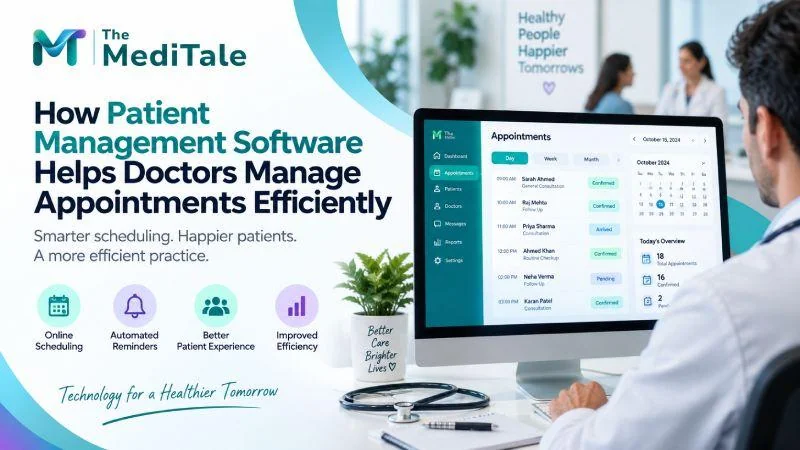
For doctors, appointment management is often one of the most frequently used functions. A well designed system allows staff to see upcoming appointments, identify available time slots, manage cancellations, and keep track of patient visits without depending entirely on manual processes.
How Patient Management Software Helps Doctors Manage Appointments
The main advantage is simple: it brings appointment related information into one organized system.
Instead of checking different registers, messages, spreadsheets, or calendars, staff can use a centralized platform to manage appointments.
Here are some of the most important ways it can help.
1. Online Appointment Scheduling Makes Booking Easier
Patients increasingly expect convenient ways to book medical appointments.
Instead of calling the clinic during working hours, patients can use an online booking facility when it is available. They can select a suitable date and time based on the doctor's available schedule.
This can reduce the number of calls handled by reception staff and make the booking process more convenient for patients.
For doctors, online scheduling can also provide better visibility into the daily calendar. Staff can see upcoming appointments and manage available slots from a central dashboard.
A simple online booking process can be especially useful for clinics that receive a large number of appointment requests every day.
2. Doctors Can Manage Their Availability More Effectively
Doctors may have different schedules throughout the week.
There may be consultation hours, procedures, meetings, emergency cases, holidays, or other professional commitments. Managing these changes manually can become difficult.
Patient management software allows authorized staff to maintain the doctor's availability digitally.
For example, a clinic can define:
- Consultation hours
- Available appointment slots
- Break periods
- Non working days
- Doctor leave
- Special consultation hours
- Different schedules for different days
When the availability changes, the appointment calendar can be updated accordingly.
This helps reduce situations where patients are booked during unavailable periods.
3. It Helps Reduce Double Bookings
Double booking can create unnecessary problems for both doctors and patients.
When two patients are assigned to the same time slot, staff may have to call one patient and request a change. This can lead to frustration and affect the clinic's schedule.
A digital appointment system can provide a centralized view of available and occupied time slots.
Before confirming a booking, staff can check the doctor's schedule and identify available appointments.
This creates a more structured scheduling process and reduces the chances of accidental duplicate bookings.
4. Automated Appointment Reminders Can Reduce Missed Visits
Missed appointments can create empty slots in a doctor's schedule.
Patients may forget an appointment because they booked it several days or weeks earlier. A reminder sent before the scheduled visit can help keep the appointment visible to the patient.
Depending on the system, reminders may be sent through channels such as:
- SMS
- Patient portal notifications
- Mobile notifications
- Other supported communication channels
For example, a clinic may send a reminder one day before the appointment and another notification on the day of the visit.
Automated reminders can reduce the need for staff to manually contact every patient.
5. Patients Can Reschedule Without Creating Extra Work
Patients sometimes need to change their appointment because of work, travel, family responsibilities, or unexpected situations.
Without a digital system, a patient may need to call reception and wait for staff to find another available slot.
A patient management system can make rescheduling more organized.
Staff can quickly review the doctor's calendar and move the appointment to another available time. If online rescheduling is supported, patients may also be able to manage the change themselves.
This can save administrative time while keeping the appointment calendar updated.
6. Patient Information Can Be Available Before the Appointment
Appointment management is not only about dates and times.
Doctors often need basic patient information before a consultation. Having patient details available in the same system can help staff prepare for upcoming visits.
A patient profile may include information such as:
- Patient contact details
- Previous visit information
- Appointment history
- Medical records where supported
- Follow up details
- Notes and other relevant information
Having this information organized can make the appointment workflow more efficient.
It also reduces the need to repeatedly ask patients for information that the clinic already has.
7. Reception Staff Can Manage More Appointments With Less Manual Work
Reception teams often handle several tasks at the same time.
They may answer phone calls, register patients, schedule appointments, respond to questions, manage cancellations, coordinate doctors, and handle billing related activities.
Manual appointment management can consume a large part of their working day.
Patient management software can automate or simplify several repetitive tasks.
For example, instead of manually checking a paper register to find an available slot, staff can view the digital calendar. Instead of calling every patient to confirm an appointment, automated reminders can handle the notification process.
This allows staff to spend more time on tasks that require direct interaction with patients.
8. Doctors Get a Clear View of Their Daily Schedule
A clear appointment calendar helps doctors understand how their day is structured.
They can see:
- Number of appointments
- Upcoming patient visits
- Appointment timings
- Follow up visits
- Cancellations
- Rescheduled appointments
- Available gaps
This can help healthcare professionals organize their consultation time more effectively.
For clinics with multiple doctors, a centralized system can also make it easier to manage individual schedules.
9. Appointment Data Can Help Clinics Understand Patient Flow
Appointment information can provide useful operational insights.
For example, clinic administrators may want to know:
- How many appointments are booked each month?
- How many patients cancel?
- How many appointments are missed?
- Which days have the highest demand?
- Which time slots are most frequently booked?
- How many follow up appointments are scheduled?
- How many appointments are completed?
Reports and dashboards can help administrators understand these patterns.
This information can support better decisions about staffing, appointment slots, consultation hours, and clinic operations.
10. It Supports Better Follow Up Management
Follow up appointments are an important part of many healthcare services.
A patient may need another consultation after a specific period. Managing these follow ups manually can lead to missed reminders or incomplete records.
Patient management software can help staff record follow up requirements and schedule future appointments.
For example, after a consultation, staff can schedule the patient's next visit based on the doctor's instructions.
The system can then keep the appointment visible in the patient's profile and calendar.
This creates a more organized approach to ongoing patient care.
What Problems Can Patient Management Software Solve?
A well implemented system can address several common appointment management challenges.
| Common Problem | How Digital Appointment Management Helps |
|---|---|
| Manual appointment registers | Provides a centralized digital calendar |
| Double bookings | Shows occupied and available time slots |
| Missed appointments | Supports automated reminders |
| Frequent phone calls | Enables online booking where available |
| Appointment cancellations | Makes cancellation tracking easier |
| Rescheduling difficulties | Allows staff to quickly find available slots |
| Unclear doctor availability | Maintains updated schedules |
| Repetitive administrative work | Automates routine appointment tasks |
| Poor appointment visibility | Provides calendar and dashboard views |
| Follow up tracking issues | Keeps future appointments organized |
The exact features will depend on the software selected and how it is configured for the healthcare organization.
How Does Patient Management Software Improve the Patient Experience?
Appointment efficiency also affects the patient's overall experience.
Consider two different situations.
In the first situation, a patient calls the clinic, waits for someone to answer, explains the reason for the visit, waits while staff checks a register, and finally receives an appointment time.
In the second situation, the patient selects an available appointment through an online system, receives confirmation, and gets a reminder before the visit.
The second process can be simpler and more convenient.
Patients generally want clear information about when they need to visit the doctor. Digital appointment management can provide this information in a more organized way.
It can also reduce unnecessary waiting and communication delays when the system is properly configured.
Can Patient Management Software Help Reduce Waiting Time?
It can help clinics manage appointment flow more systematically, although software alone cannot guarantee shorter waiting times.
Waiting time can depend on several factors, including consultation duration, emergency cases, patient volume, doctor availability, and delays during the day.
A digital appointment system can give staff better visibility into the schedule. If a doctor is running behind, staff may be able to communicate the delay to waiting patients where appropriate.
The system can also help clinics structure appointment slots according to their operational requirements.
This can support better scheduling and patient flow management.
What Should Doctors Look for in Patient Management Software?
Choosing healthcare software requires more than looking at the number of features.
Doctors and clinic administrators should consider whether the system fits their actual workflow.
Important areas to evaluate include:
Easy Appointment Scheduling
The appointment calendar should be simple for reception staff and healthcare professionals to use.
Online Booking
If online appointments are important for the practice, check whether the software supports patient self booking.
Reminders and Notifications
Look for flexible reminder options that can help patients remember upcoming visits.
Doctor Schedule Management
The system should support different working hours, holidays, breaks, and availability requirements.
Patient Records
Patient information should be organized and easy for authorized users to access.
Security and Access Control
Healthcare information is sensitive. Clinics should evaluate how the software protects patient information and manages user access.
Reporting
Useful reports can help administrators understand appointment volumes, cancellations, missed appointments, and other operational metrics.
Scalability
The solution should be capable of supporting the clinic as its number of doctors, patients, and appointments grows.
How Can Clinics Get the Most From Patient Management Software?
Software implementation is only one part of improving appointment management.
Clinics should also create clear processes for staff.
For example, define who can create appointments, who can modify schedules, how cancellations should be recorded, when reminders should be sent, and how follow up appointments should be handled.
Staff training is equally important.
Even a feature rich system may not deliver the expected results if employees do not understand how to use it properly.
Regularly reviewing appointment data can also help clinics identify scheduling problems and improve their workflow over time.
The Future of Appointment Management in Healthcare
Healthcare is becoming increasingly digital, and appointment management is an important part of this transition.
Patients expect convenient booking options, timely reminders, accessible information, and smoother communication with healthcare providers.
For doctors and clinics, the focus is not simply on replacing a paper appointment book with a digital calendar. The larger goal is to create a connected workflow where appointment scheduling, patient information, communication, and administrative processes work together.
Patient management software can provide the foundation for this workflow.
When properly selected and implemented, it can help clinics organize appointments, reduce repetitive administrative tasks, improve schedule visibility, and create a more convenient experience for patients.
Conclusion
Efficient appointment management can have a direct impact on how smoothly a medical practice operates. Manual scheduling can become difficult as patient numbers increase, while missed appointments, scheduling conflicts, and poor follow up management can create additional administrative pressure.
Patient Management Software for Doctors provides a structured way to manage these challenges. From online appointment booking and automated reminders to doctor availability management and follow up scheduling, digital tools can bring important appointment related activities into one centralized system.
The right solution should fit the clinic's workflow, support secure patient information management, and remain simple enough for staff and patients to use comfortably.
If you are looking for a healthcare technology solution that can help streamline patient appointments and related workflows, explore the Patient Management Software solution and see how it can support your medical practice.
Ready to improve the way your clinic manages appointments? Contact us today to discuss your requirements and find a patient management solution suited to your healthcare workflow.
Learn more aboutPatient Management Software and contact the team to discuss your requirements.