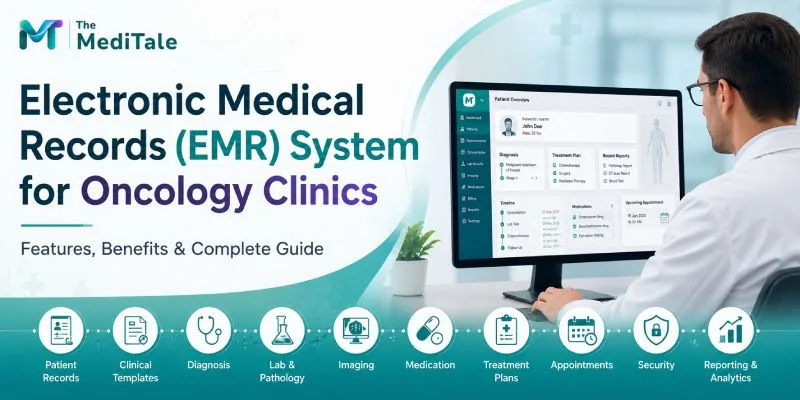
What Is an EMR System for Oncology Clinics?
An Electronic Medical Record (EMR) system is a digital version of a patient's medical record used by healthcare professionals to document and manage clinical information.
For an oncology clinic, an EMR may contain:
- Patient demographics
- Medical and surgical history
- Previous diagnoses
- Cancer-related clinical notes
- Pathology and laboratory reports
- Imaging reports
- Medication history
- Prescriptions
- Treatment documentation
- Follow-up notes
- Referrals
- Allergies
- Clinical observations
- Appointment history
- Billing-related information
The important distinction is that an oncology EMR should not simply act as a digital filing cabinet.
It should support the way oncologists actually work.
During a consultation, for example, an oncologist may need to review previous investigations, assess the patient's current condition, document findings, prescribe medication, update the treatment plan, and schedule follow-up care.
A well-designed EMR brings these activities together within a connected clinical workflow.
Why Do Oncology Clinics Need Specialized EMR Software?
Cancer care often involves long-term treatment and repeated interactions between patients and healthcare professionals. A patient's clinical record can become extensive over time.
A generic medical record system may be capable of storing information, but oncology practices often require more structured documentation and better organization of longitudinal patient data.
1. Oncology Records Can Become Complex
A patient's record may include information from several diagnostic and treatment stages.
Without an organized digital system, finding previous reports or understanding the sequence of treatment can take unnecessary time.
An EMR creates a centralized record that can be reviewed during current and future consultations.
2. Multiple Healthcare Professionals May Be Involved
Cancer care can involve oncologists, surgeons, radiologists, pathologists, nurses, pharmacists, laboratory professionals, and other specialists.
When authorized users work from a shared clinical record, relevant information can be easier to access and coordinate.
3. Repetitive Documentation Can Consume Clinical Time
Oncologists frequently document similar information across follow-up visits.
Structured templates can reduce repetitive typing while still allowing clinicians to add patient-specific observations and clinical reasoning.
4. Treatment History Needs to Remain Accessible
Cancer treatment is often a longitudinal process.
An organized digital record can help clinicians review previous consultations, investigations, prescriptions, and treatment documentation rather than reconstructing the patient's history from multiple sources.
5. Paper-Based Records Are Difficult to Scale
Physical records require storage, manual filing, physical retrieval, and appropriate safeguards.
As patient volume increases, maintaining a paper-based system can become increasingly difficult.
Digital records provide searchable and structured access to information while reducing dependence on physical files.
Key Features of an Electronic Medical Records System for Oncology Clinics
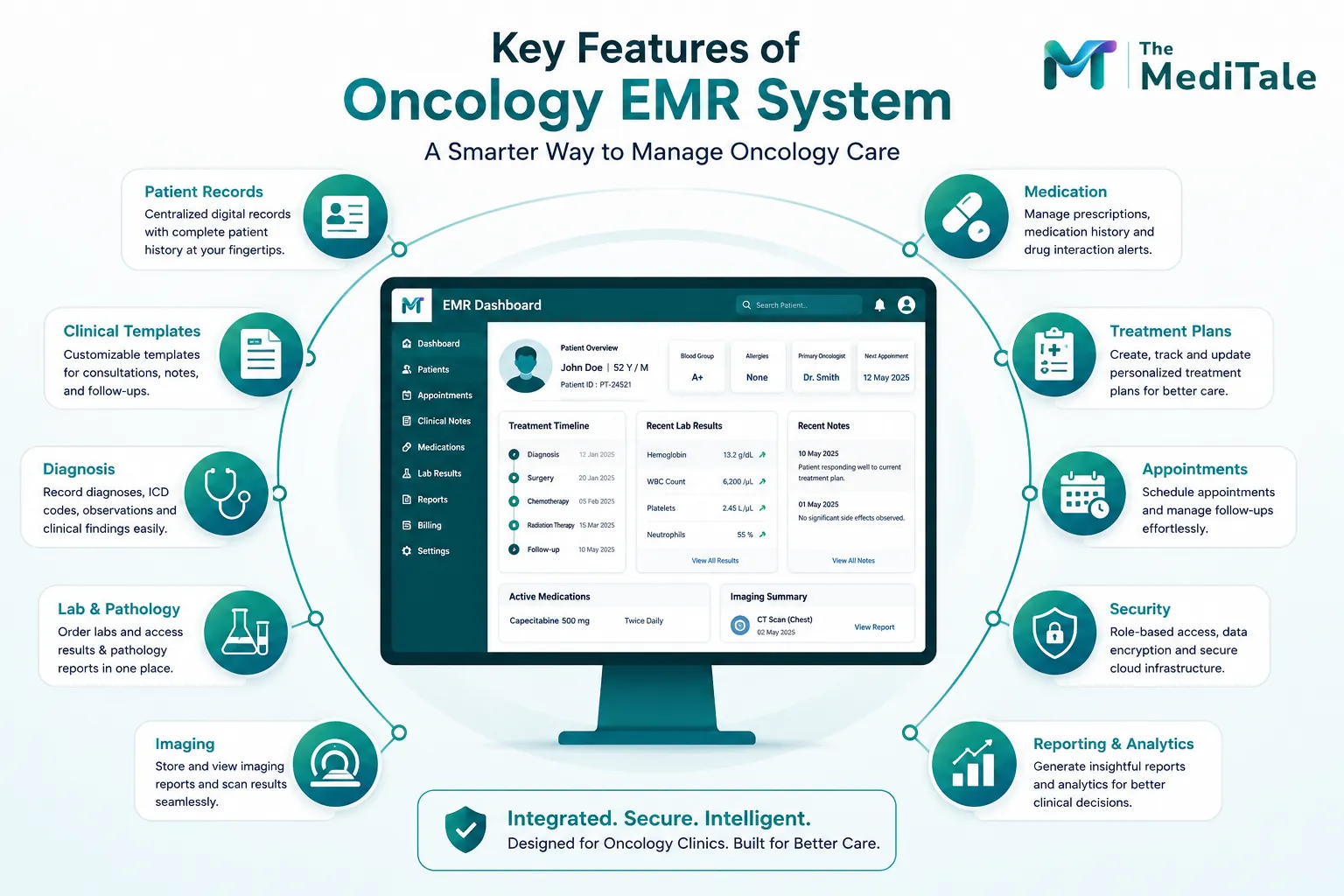
Not every EMR platform offers the same capabilities. Oncology clinics should focus on features that support clinical workflows rather than simply choosing a system with the longest feature list.
1. Centralized Patient Medical Records
A core function of any oncology EMR is maintaining a comprehensive patient record.
The system should allow authorized clinicians to quickly review relevant medical history, diagnoses, medications, reports, clinical notes, and previous consultations.
The goal is to provide clinical context without requiring the oncologist to search through multiple disconnected systems.
2. Customizable Clinical Templates
Clinical documentation varies between specialties.
An oncology clinic may require templates for:
- Initial oncology consultations
- Follow-up visits
- Medical history
- Clinical examination
- Diagnosis
- Investigation review
- Treatment planning
- Medication documentation
- Referral notes
- Follow-up instructions
Customizable templates allow clinics to adapt the system to their existing workflows.
For practices evaluating EMR software, customization should be one of the important evaluation criteria.
3. Patient History and Clinical Documentation
An oncology EMR should provide a clear view of the patient's previous clinical information.
Rather than displaying isolated encounters, the system should help clinicians understand the patient's history over time.
This is particularly useful during follow-up consultations when previous findings and treatment decisions need to be reviewed.
4. Laboratory and Pathology Records
Laboratory and pathology information can be an important part of oncology documentation.
A connected EMR can help clinicians access investigation orders and results within the patient's record rather than relying entirely on separate documents.
Where integrations are available, electronic orders and results can reduce manual data entry and improve information continuity.
5. Diagnostic and Imaging Reports
Oncology practices may need to review diagnostic and imaging reports during consultations.
An EMR should provide an organized way to associate these reports with the patient's medical record.
The exact integration requirements will depend on the clinic's diagnostic infrastructure and the systems used by external laboratories or imaging providers.
6. Medication and Prescription Management
Medication information should be easy to review and update.
A useful EMR can maintain medication history, support electronic prescribing, and provide relevant safety alerts where configured.
Medication allergies and potential drug interactions are examples of information that can be surfaced through clinical decision-support functionality.
However, alerts should support—not replace—the professional judgment of the prescribing clinician.
7. Treatment Plan Documentation
Treatment documentation is an important part of oncology care.
The EMR should make it possible to record the clinician's treatment-related decisions, instructions, medication changes, investigations, and follow-up requirements.
Structured documentation can also make subsequent consultations easier because the next clinician can review what was previously recorded.
8. Appointment and Follow-Up Management
Clinical documentation and appointment management should not exist in isolation.
An integrated system can connect the patient's consultation with appointment scheduling and follow-up planning.
This can be particularly useful for oncology practices where patients may require repeated consultations and monitoring.
9. Role-Based Access
Patient medical records contain sensitive information.
Different users within an oncology clinic may have different responsibilities, so the EMR should provide appropriate role-based access controls.
For example, administrative staff may require access to registration and scheduling information, while clinicians need access to clinical documentation.
Access should be based on organizational requirements and the principle of providing users with the information necessary for their responsibilities.
10. Audit Trails and Data Protection
A modern healthcare EMR should provide appropriate security mechanisms for protecting patient information.
Depending on the platform, these may include:
- Role-based permissions
- Authentication controls
- Encryption
- Backups
- Audit logs
- Data access monitoring
- Secure infrastructure
Healthcare organizations should also review the vendor's policies and technical architecture against the privacy and regulatory requirements applicable to their location.
11. Cloud-Based Accessibility
Cloud-based EMR platforms can allow authorized healthcare professionals to access records from supported devices and locations.
This can be useful for organizations operating across multiple clinics or locations.
However, convenience should never come at the expense of security. Clinics should evaluate authentication, permissions, encryption, backup procedures, availability, and vendor support before choosing a cloud platform.
12. Reporting and Analytics
Structured EMR data can also support operational reporting.
Depending on the system, reports may cover:
- Patient visits
- Appointment activity
- Investigation orders
- Follow-up activity
- Prescriptions
- Billing information
- Documentation status
- Operational performance
Analytics can help administrators understand workflows and identify areas that may require improvement.
Benefits of EMR Software for Oncology Clinics
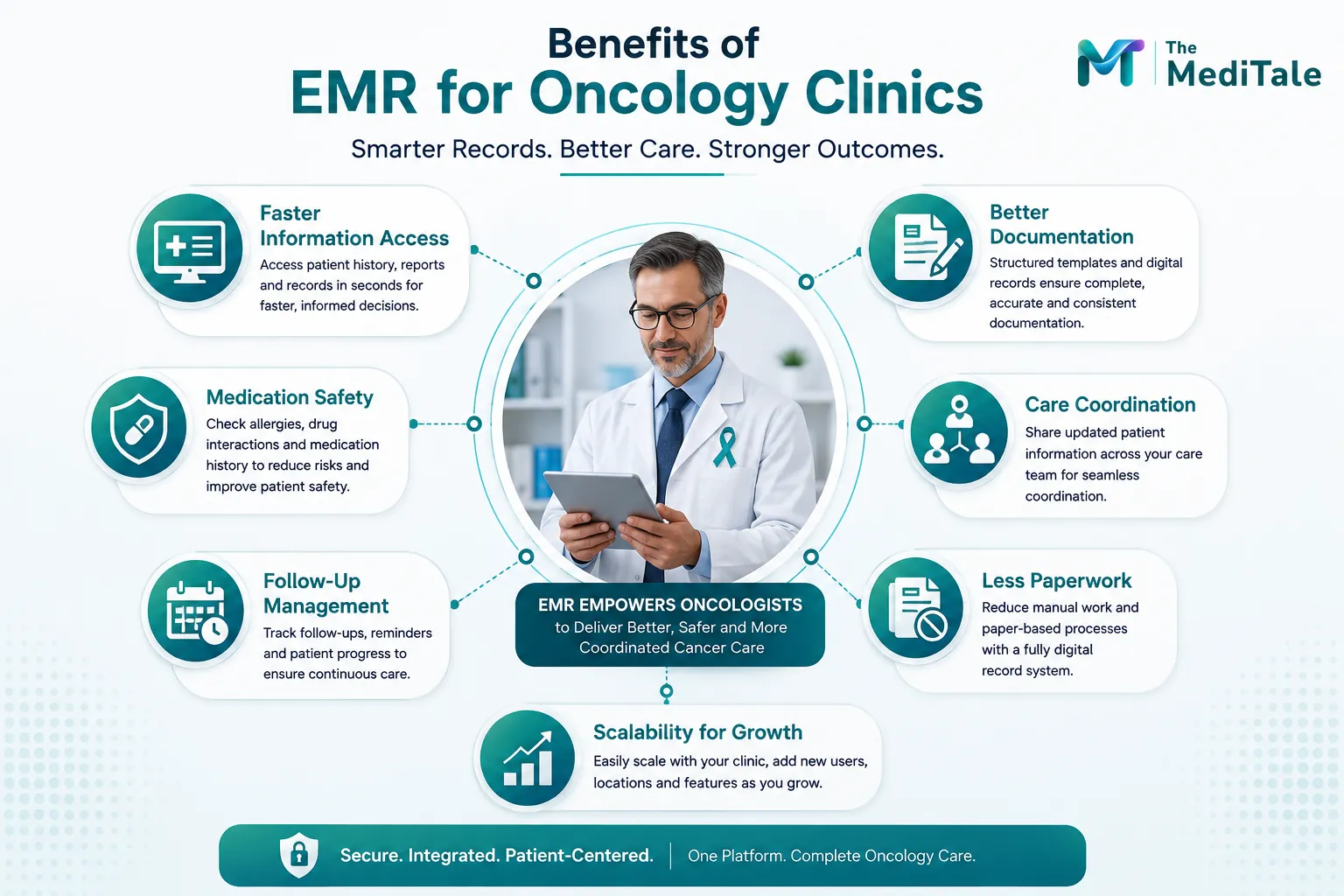
The value of an oncology EMR is not limited to eliminating paper files. The larger benefit comes from connecting information and workflows.
Improved Access to Patient Information
An electronic record makes patient information searchable and accessible to authorized users.
Instead of looking through physical files, clinicians can review relevant information from a centralized record.
Better Continuity of Care
Cancer treatment often requires repeated interactions with healthcare professionals.
Maintaining a longitudinal electronic record helps preserve information between visits and can make follow-up consultations more informed.
More Consistent Documentation
Structured templates encourage consistent documentation across consultations.
At the same time, clinicians should retain the flexibility to document patient-specific findings and professional observations.
Reduced Duplicate Data Entry
When information is shared between connected modules, staff may not need to enter the same information repeatedly.
For example, patient registration information can potentially flow into the clinical record, while investigation orders can connect with results.
Easier Record Retrieval
Digital records can make it easier to search for previous consultations, prescriptions, investigation results, and other clinical information.
This can be especially valuable when patients have extensive medical histories.
Better Coordination
A shared digital record can help authorized members of the care team access relevant information.
This can support communication between clinical and administrative teams while reducing reliance on fragmented records.
Improved Medication Documentation
Maintaining a structured medication history provides clinicians with a clearer view of current and previous prescriptions.
Clinical alerts can add another layer of decision support where appropriate.
Reduced Paper Dependency
Digitizing medical records can reduce the physical storage and manual filing requirements associated with paper-based systems.
Scalability
A digital platform can provide a foundation for growing practices, multi-location clinics, and healthcare organizations that need standardized workflows across facilities.
Oncology EMR Workflow: From Registration to Follow-Up
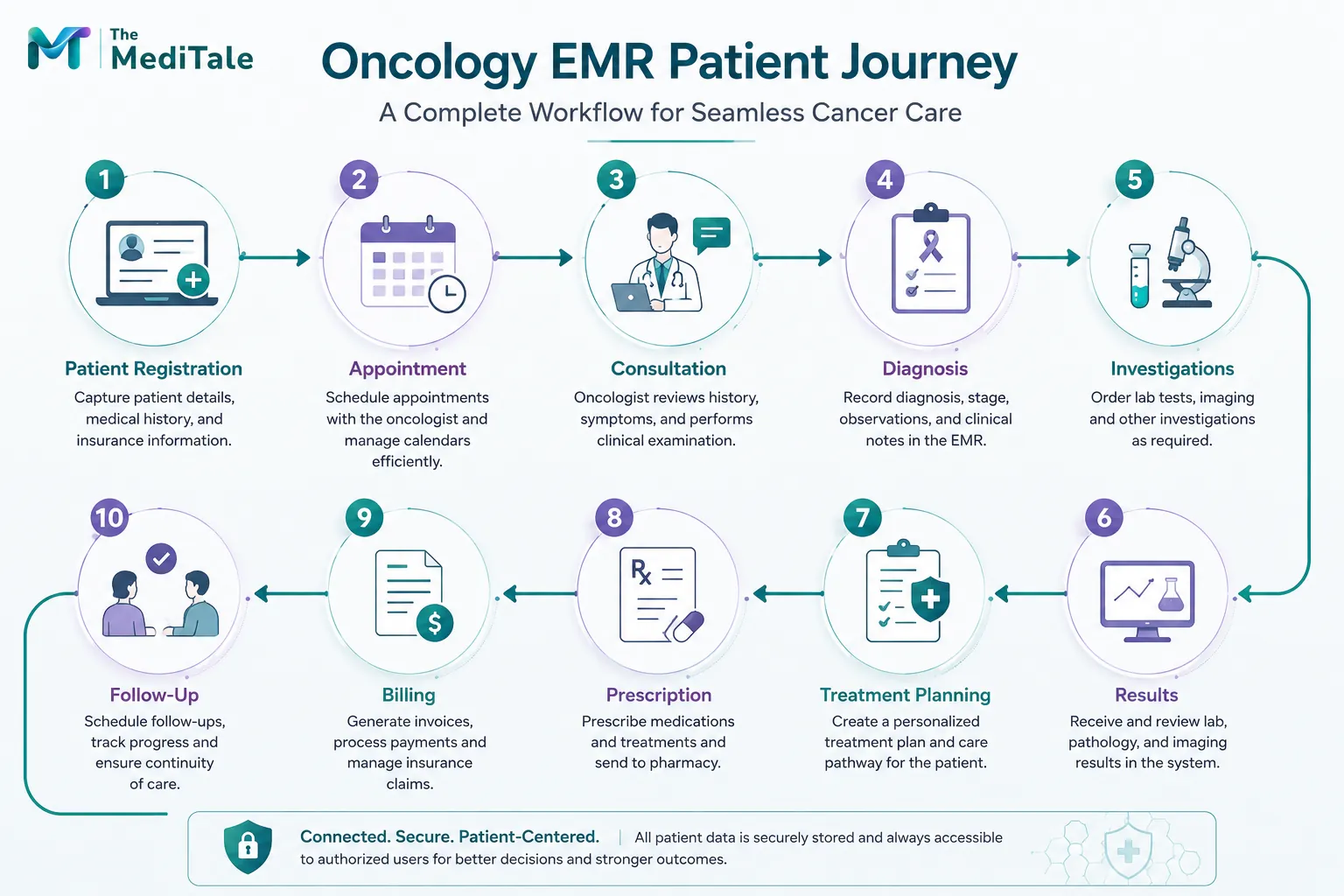
A well-integrated system can connect different stages of the patient journey.
Patient Registration → Appointment → Clinical Consultation → Diagnosis & Documentation → Investigation Orders → Results → Treatment Planning → Prescription → Billing → Follow-Up
Step 1: Patient Registration
Patient demographic and administrative information is entered into the system.
Step 2: Appointment
The patient is scheduled for a consultation with the appropriate oncologist.
Step 3: Clinical Consultation
The oncologist reviews the patient's history, current concerns, previous records, and available investigation results.
Step 4: Diagnosis and Documentation
The clinician records the diagnosis, examination findings, clinical observations, and relevant notes.
Step 5: Investigation Orders
Laboratory, pathology, imaging, or other investigations can be ordered according to the clinical workflow.
Step 6: Results
Available investigation results are added to or associated with the patient's electronic record.
Step 7: Treatment Planning
The oncologist documents the treatment approach and relevant clinical instructions.
Step 8: Prescription
Required medications are prescribed and recorded within the patient's clinical history.
Step 9: Billing
Where EMR and billing systems are integrated, relevant services and charges can flow into the billing workflow.
For clinics looking to connect clinical and administrative operations, clinic management software can provide a broader environment around the EMR.
Step 10: Follow-Up
The next consultation, follow-up instructions, and ongoing care requirements are recorded.
This creates a continuous digital trail that can be reviewed during future encounters.
Also read: How to Use EMR Software: A Complete Step-by-Step Guide for Healthcare Providers
EMR vs EHR: Is There a Difference?
EMR and EHR are often used interchangeably, although they can refer to different concepts.
An EMR (Electronic Medical Record) generally refers to a digital patient record maintained within a particular healthcare practice or organization.
An EHR (Electronic Health Record) typically has a broader focus and may support the exchange of health information across multiple healthcare providers and healthcare settings.
For oncology clinics, the terminology is less important than the actual capabilities of the software.
A clinic should evaluate whether the system supports its requirements for clinical documentation, interoperability, security, data exchange, workflow integration, and patient access.
How to Choose the Best EMR System for an Oncology Clinic
Choosing an EMR is an operational decision as much as a technology decision.
Understand the Existing Workflow
Before selecting software, document how patients currently move through the clinic.
Consider registration, appointments, consultation, investigations, prescriptions, billing, and follow-up.
The selected system should improve these workflows rather than create additional complexity.
Look for Customization
An oncology clinic should not have to force every consultation into a generic template.
Ask whether clinical templates, fields, workflows, and reports can be configured according to the clinic's requirements.
Evaluate Integration
Consider whether the EMR can work with existing:
- Laboratory systems
- Pharmacy systems
- Billing platforms
- Appointment systems
- Diagnostic systems
- Patient portals
- Telemedicine platforms
- Hospital information systems
Integration requirements will vary between organizations, so they should be defined before implementation.
Assess Security
Ask vendors how patient information is protected.
Review access controls, encryption, authentication, backups, audit logs, data hosting, disaster recovery, and applicable regulatory requirements.
Prioritize Usability
An EMR can have extensive functionality and still fail to deliver value if clinicians find it difficult to use.
The interface should make common tasks straightforward and reduce unnecessary navigation.
Consider Scalability
Think beyond current requirements.
The system should be capable of supporting additional clinicians, departments, locations, users, and integrations if the organization grows.
Review Training and Support
Implementation requires more than installing software.
Staff training, onboarding, data migration, technical support, workflow configuration, and ongoing updates should all be considered.
Common Mistakes to Avoid When Implementing an Oncology EMR
Choosing Software Based Only on Features
A long feature list does not necessarily mean a system is appropriate for oncology.
Workflow fit and usability are equally important.
Ignoring Clinician Feedback
Doctors and clinical staff will use the system every day.
Their feedback should be incorporated during evaluation and implementation.
Digitizing a Poor Workflow Without Improving It
Simply converting paper forms into digital forms does not automatically improve efficiency.
Clinics should first identify unnecessary steps, duplicated information, and bottlenecks.
Underestimating Training
Even intuitive software requires onboarding.
Training should cover both the technical system and the clinic's revised workflows.
Neglecting Data Migration
Existing patient records may need to be transferred from paper files or legacy systems.
Data migration should be planned carefully to protect accuracy and continuity.
How an Integrated Healthcare Platform Can Complement an Oncology EMR
An EMR works best when clinical documentation does not remain isolated from other essential clinic operations.
For example, patient registration, scheduling, laboratory workflows, pharmacy, billing, and patient communication can potentially be connected through an integrated healthcare platform.
This approach can reduce information silos and create a more consistent patient journey.
For clinics that also need structured financial workflows, hospital billing software can connect billing activities with broader healthcare operations.
An integrated approach can be particularly useful for growing organizations where managing several independent applications becomes increasingly difficult.
The Role of AI in the Future of Oncology EMR
Artificial intelligence is increasingly being explored as a supporting technology within healthcare documentation and administrative workflows.
Potential applications include:
- Voice-assisted clinical documentation
- Automated transcription
- Documentation assistance
- Coding support
- Data summarization
- Workflow automation
- Operational analytics
The objective should not be to replace clinical expertise.
Instead, AI can be used to reduce repetitive administrative work and help clinicians interact with information more efficiently.
Any AI capability used in oncology should be implemented with appropriate human oversight, validation, privacy controls, and organizational governance.
Why the Right EMR Matters for Oncology Clinics
For an oncology practice, an EMR should ultimately make information easier to capture, find, understand, and use.
The right system can bring together clinical documentation, patient history, investigations, prescriptions, appointments, billing, and follow-up information within a structured workflow.
The technology should remain in the background while the clinical team remains focused on the patient.
That is why oncology clinics should evaluate EMR platforms based on real-world workflows rather than marketing claims alone.
How MediTale Fits Into the Modern EMR Landscape
MediTale provides a cloud-based EMR software platform with capabilities including clinical templates, patient history, documentation, laboratory and pharmacy connectivity, prescribing workflows, patient engagement, and security controls.
For an oncology clinic, the key consideration is whether those capabilities can be configured around its specific clinical and operational requirements.
A personalized demonstration can help the clinic assess workflows, integrations, user roles, customization, and implementation requirements before making a decision.
Conclusion
An Electronic Medical Records (EMR) system for oncology clinics can provide a structured foundation for managing complex patient information and connecting different stages of clinical care.
The most useful systems go beyond digital record storage. They help clinicians access patient history, document consultations, review investigations, manage prescriptions, plan follow-ups, and coordinate information across connected workflows.
For oncology clinics evaluating EMR technology, the priority should be clear: choose a platform that fits the way clinicians work, protects sensitive patient information, integrates with essential systems, and can grow alongside the organization.
The right technology should simplify clinical administration—not add another layer of complexity to patient care.
For practices evaluating their options, a practical demonstration using real oncology workflows can be the best way to determine whether an EMR platform is suitable for their clinical environment.